Didalam sebuah pekerjaan sangat dibutuhkan ketelitian agar mendapatkan hasil yang terbaik hal ini merupakan tujuan dan harapan dari setiap orang yang tidak ingin repot-repot dalam mengolah data, tak terkecuali terkadang dalam memberikan nomor halaman pada daftar isi. Terkadang didalam daftar isi nomor halaman tidak sesuai dengan hasil cetakan, banyak faktor yang dapat mempengaruhi hal ini seperti adanya perbaikan isi dari tulisan sehingga membuat suatu halaman menjadi bertambah atau berkurang yang nantinya sangat berdampak pada perubahan daftar isi. Apabila terdapat perubahan tersebut di halaman lembar kerja membuat daftar isi harus di perbaiki ulang dan disesuaikan dengan halaman yang sebenarnya namun karena terburu-buru membuat hal tersebut tidak dapat diperbaiki.
Nomor halaman didaftar isi merupakan petunjuk penting dan sangat mempermudah dalam pencarian data dalam suatu file baik berupa makalah, buku, prosiding, brosur dan sebagainya yang memiliki banyak lembaran dan tidak efiisen apabila harus membuka perhalaman atau persatu satu halaman dapat membuang-buang waktu percuma, untuk itu peranan daftar isi sangat diperlukan.
Ada beberapa cara yang dapat dilakukan apabila ingin membuat ketikan menjadi rapi dan baik tak terkecuali untuk membuat halaman daftar isi. Khusus untuk membuat daftar isi dapat menggunakan fasilitas Tabulasi Dan Heading Style yang sudah disediakan oleh Microsoft Office, atau ada cara lain yang dapat digunakan lebih efisien dan simple. Berikut akan disampaikan tatacara membuat daftar isi menggunakan Tabulasi dan Heading Style :
A. Tabulasi
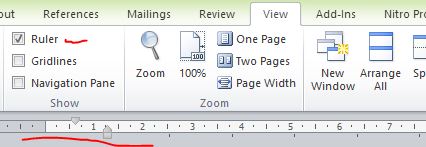
Teknik ini menggunakan tabulasi dan pemahaman tentang ruler (mistar/penggaris) dapat dilakukan (untuk menampilkan ruler dapat di klik disini) pengaturannya sebelum atau setelah mengetik isi dari halaman daftar isi. Adapun tatcaranya sebagai berikut:
1. Sebelum pengetikan hasil daftar isi
a. Klik menu Home
b. Klik tanda panah pada grup paragraph
c. Klik tombol Tabs, maka akan tampil pengaturan paragraph yang berisi :
· Pada kolom Tab Stop Position masukkan angka yang diinginkan, sebelum menentukan angka pemberhentian tabulasi ada baiknya perhatikan ruler (penggaris) pada tampilan layar komputer yang sedang digunakan.
· Aligment, pilih perataan yang diinginkan namun dalam praktek kali ini dengan memilih right, maksudnya adalah perataan akan dimulai dari sebelah kanan
· Leader, berfungsi untuk menampilkan tanda pada hasil tabulasi. Yang terdiri dari beberapa jenis dan di sesuaikan dengan keinginan. Namun jika memilih none maka tidak akan ditampilkan tanda.
· Klik tombol set
d. Klik Ok, untuk menyelesaikan pengaturan
Selanjutnya akan dibawa kembali kelayar awal, selanjutnya ketiklah isi dari halaman daftar ini sedangkan untuk melihat hasil dari pengaturan tersebut tekan Tab pada keyboard maka akan tampil tanda “titik-titik”, contoh sebagai berikut
Kata Pengantar …………………………………………………………………. 1
2. Sesudah pengetikan hasil daftar isi (diakhir pengetikan)
a. Blok teks dalam daftar isi
b. Kemudian lakukan langkah diatas
B. Heading Style
Terdapat dua langkah yang harus dilakukan untuk menggunakan Heading Style
1. Menerapkan Heading Style
a. Klik menu Home
b. Pada grup Styles klik heading 1 kemudian ketikkan kalimat/teks missal: BAB I Pendahuluan, lakukan langkah ini untuk setiap teks yang akan ditampilkan pada halaman daftar isi.
2. Menampilkan ke dalam halaman daftar isi
1. Pada halaman yang ditunjuk untuk menampilkan daftar isi klik menu References
2. Pada grup Table of Contents klik Table of Contents maka akan diberikan pilihan style seperti automatic table 1, automatic table 2, insert tabel of contents..